

Mostrando postagens com marcador Tutoriais. Mostrar todas as postagens
teste do eddy


»]~-------------------------TUTOS------------------------~[«
Olá pessoal hoje eu trago mais um tutorial de como colocar o passarinho voando no blog, é muito prático e fácil
1º Abra um Gadget e cole o seguinte código:
<script src="http://oloblogger.googlecode.com/files/tripleflap.js" type="text/javascript"></script>
<script type="text/javascript">
var birdSprite='http://oloblogger.googlecode.com/files/birdsprite.png';
var targetElems=new Array('img','hr','table','td','div','input','textarea','button','select','ul','ol','li','h1','h2','h3','h4','p','code','object','a','b','strong','span');
var twitterAccount = 'Link do seu Twitter Aqui';
var twitterThisText ='';
tripleflapInit();
</script>
é isso ai pessoal é muito fácil não ? Vlw


Olá Pessoal hoje eu trago mais um tutorial para vocês de como mudar o endereço (URL) do seu blog sem tes que criar outro é muito prático e não precisa de nada =)
» PARA ALMENTAR O TAMANHO DAS IMAGENS BASTA CLICAR NELAS! «
1º Passo. Vá em Configurações


» PARA ALMENTAR O TAMANHO DAS IMAGENS BASTA CLICAR NELAS! «
1º Passo. Vá em Configurações

2º Passo. Vá em Publicação

3º Passo. Mude o endereço !

E É ISSO PESSOAL ATÉ O PRÓXIMO TUTORIAL!
»]~-------------------------TUTOS------------------------~[«
1º Pegue uma imagem igual a esta e vá no seu programa de design
2º e é Só escrever nela blz? muito fácil e prático vou estar deixando a imagem abaixo para vocês =)


»]~-------------------------TUTOS------------------------~[«
Eae galera hoje eu trago mais um tutorial de como colocar um menu de transição igual o da New Downloads.
1º Procure por essa Tag ]]></b:skin>
2° acima dela cole este código
.post h3:first-letter {
font: normal bold 130% Trebuchet, Trebuchet MS, Arial, sans-serif; /* fonte */
text-decoration:none;color:#A020F0; /* Cor da Letra */
font-weight: bold}
ul li, ol li {line-height: 20px;list-style-position: inside;list-style-type: disc;padding: 0;transition: all 0.4s ease;-webkit-transition: all 0.4s ease;-o-transition: all 0.4s ease;-moz-transition: all 0.4s ease;}
ul li:hover, ol li:hover {padding: 0 10px;}


1 PASSO :

REGISTRE-SE NO http://faceyourmanga.com CLIQUE EM LOGIN E EM SEGUIDA SIGNUP
CADRASTE-SE , DEPOIS DE COLOCAR TODOS OS DADOS ACEITE TERMOS DE USO , E CLIQUE EM SIGNUP >
PASSO 2:

DEPOIS DE CORFIRMAR EMAIL , FASSA O LOGIN COM USERNAME E SENHA
PASSO 3:

AGORA CLIQUE EM CREATE !
PASSO 3:

AGORA FASSA SEU AVATAR COLOCANDO OQUE VOCE DESEJAR
PASSO 4:

DEPOIS DE PRONTO CLIQUE EM SAVE !!
PASSO 5:

CLIQUE EM DOWNLOAD , ESPERE BAIXAR E PRONTO AGORA SO SALVAR EM ALGUMA PASTA OU LUGAR E ULTILIZAR NO SEU MSN , SKYPE , ORKUT , FACEBOOK ETCs..
ESPERO TER AJUDADO

Então vamos lá :)
Primeiramente abra o painel do blogger, clique em Design, Editar HTML
agora aperte CTRL+F e procure pela palavra ]]></b:skin>
Após encontrar a palavra, cole o seguinte código imediatamente acima dela:
#gb { position:fixed; top:150px; z-index:+1000; left:-610px; } * html #gb { position:relative; } .gbtab { height:161px; width:47px; float:right; cursor:pointer; background:url('https://blogger.googleusercontent.com/img/b/R29vZ2xl/AVvXsEgwv3Ea0T4Ryx9TopJKSCp1xLICrsR5ocjIsNfDQeiyy6djtB8N6GH1pjEEPskcPK4qu3vfKNzhZr0QRW5KtfoaR-AueeVpN440cVuVQG_En8L2Vvv7u37mIylxc6me9c9LKseWLYPadCI/s1600/6+IMG+LATERAL+XAT+BY+BAIXE+RENDERS.png') no-repeat; margin-top:20px; } .gbcontent { float:left; border:2px solid #8c00c1; background:#fff; opacity:0.80; -moz-opacity: 0.80; filter: alpha(opacity=80); -webkit-border-radius: 20px; border-radius: 20px; -khtml-border-radius: 20px; padding:8px; }
Agora procure pela palavra : </body> Cole o seguinte código imediatamente acima da palavra: </body>
<script type='text/javascript'> function showHideGB(){ var gb = document.getElementById("gb"); var w = gb.offsetWidth; gb.opened ? moveGB(0, 47-w) : moveGB(20-w, 0); gb.opened = !gb.opened; } function moveGB(x0, xf){ var gb = document.getElementById("gb"); var dx = Math.abs(x0-xf) > 10 ? 5 : 1; var dir = xf>x0 ? 1 : -1; var x = x0 + dx * dir; gb.style.left = x.toString() + "px"; if(x0!=xf){setTimeout("moveGB("+x+", "+xf+")", 10);} } </script> <div id='gb'> <div class='gbtab' onclick='showHideGB()'> </div> <div class='gbcontent'> <div style='line-height:0;background-position:center;width:590px;height:310px;'>
<embed align='middle' allowscriptaccess='sameDomain' flashvars='id=163040885' height='310' name='chat' pluginspage='http://xat.com/update_flash.shtml' quality='high' src='http://www.xatech.com/web_gear/chat/chat.swf' type='application/x-shockwave-flash' width='590' wmode='transparent'/>
</div> </div> </div>
O que está em vermelho substitua pelo código do seu xat,
vizualize para ver se está tudo correto, se estiver salve
boa sorte =D
opiniões criticas duvidas qualquer coisa deixa um comentario ae blz.
Fonte: Chapa Downloadss
.png)
Primeiramente abra o painel do blogger, clique em Design, Editar HTML
agora aperte CTRL+F e procure pela palavra ]]></b:skin>
Após encontrar a palavra, cole o seguinte código imediatamente acima dela:
#gb { position:fixed; top:150px; z-index:+1000; left:-610px; } * html #gb { position:relative; } .gbtab { height:161px; width:47px; float:right; cursor:pointer; background:url('https://blogger.googleusercontent.com/img/b/R29vZ2xl/AVvXsEgwv3Ea0T4Ryx9TopJKSCp1xLICrsR5ocjIsNfDQeiyy6djtB8N6GH1pjEEPskcPK4qu3vfKNzhZr0QRW5KtfoaR-AueeVpN440cVuVQG_En8L2Vvv7u37mIylxc6me9c9LKseWLYPadCI/s1600/6+IMG+LATERAL+XAT+BY+BAIXE+RENDERS.png') no-repeat; margin-top:20px; } .gbcontent { float:left; border:2px solid #8c00c1; background:#fff; opacity:0.80; -moz-opacity: 0.80; filter: alpha(opacity=80); -webkit-border-radius: 20px; border-radius: 20px; -khtml-border-radius: 20px; padding:8px; }
Agora procure pela palavra : </body> Cole o seguinte código imediatamente acima da palavra: </body>
<script type='text/javascript'> function showHideGB(){ var gb = document.getElementById("gb"); var w = gb.offsetWidth; gb.opened ? moveGB(0, 47-w) : moveGB(20-w, 0); gb.opened = !gb.opened; } function moveGB(x0, xf){ var gb = document.getElementById("gb"); var dx = Math.abs(x0-xf) > 10 ? 5 : 1; var dir = xf>x0 ? 1 : -1; var x = x0 + dx * dir; gb.style.left = x.toString() + "px"; if(x0!=xf){setTimeout("moveGB("+x+", "+xf+")", 10);} } </script> <div id='gb'> <div class='gbtab' onclick='showHideGB()'> </div> <div class='gbcontent'> <div style='line-height:0;background-position:center;width:590px;height:310px;'>
<embed align='middle' allowscriptaccess='sameDomain' flashvars='id=163040885' height='310' name='chat' pluginspage='http://xat.com/update_flash.shtml' quality='high' src='http://www.xatech.com/web_gear/chat/chat.swf' type='application/x-shockwave-flash' width='590' wmode='transparent'/>
</div> </div> </div>
O que está em vermelho substitua pelo código do seu xat,
vizualize para ver se está tudo correto, se estiver salve
boa sorte =D
opiniões criticas duvidas qualquer coisa deixa um comentario ae blz.
Fonte: Chapa Downloadss
Tá Ai Pessoal , Como Criar um servidor SA-MP 0.3c , Bom Aproveito do seu Jogo :)


Bom Pessoal é muito Fácil e prático ! e ta ai uma vídeo aula para vocês :)
1ª PARA UNIR OS ARQUIVOS VOCÊ VAI PRECISAR BAIXAR O PROGRAMA HJSPLIT
2ª DEPOIS DE TER FEITO O DOWNLOAD DE TODAS AS PARTES ,COLOQUE-AS TODAS EM UMA MESMA PASTA SEM ALTERAR O NOME. DEPOIS ABRA O PROGRAMA. COMO ESTÁ EM ZIP, VAI PERGUNTAR SE QUER EXTRAIR. NÃO PRECISA, SÓ SE QUISER MESMO. É SÓ EXECUTAR… CLIQUE EM “JOIN”, COMO MOSTRA A IMAGEM:

3ª VAI APARECER PRIMEIRO ESSA TELA ROXA QUE ESTÁ ATRÁS. NELA CLIQUE EM “Input File” . LOGO DEPOIS VAI APARECER PARA ESCOLHER O ARQUIVO, É SÓ ESCOLHER O ARQUIVO COM EXTENSÃO 1 E ABRIR. DEPOIS DISSO O PROGRAMA VAI JUNTAR OS ARQUIVOS E DAR UM AVISO QUANDO ESTIVER PRONTO.

2ª DEPOIS DE TER FEITO O DOWNLOAD DE TODAS AS PARTES ,COLOQUE-AS TODAS EM UMA MESMA PASTA SEM ALTERAR O NOME. DEPOIS ABRA O PROGRAMA. COMO ESTÁ EM ZIP, VAI PERGUNTAR SE QUER EXTRAIR. NÃO PRECISA, SÓ SE QUISER MESMO. É SÓ EXECUTAR… CLIQUE EM “JOIN”, COMO MOSTRA A IMAGEM:
3ª VAI APARECER PRIMEIRO ESSA TELA ROXA QUE ESTÁ ATRÁS. NELA CLIQUE EM “Input File” . LOGO DEPOIS VAI APARECER PARA ESCOLHER O ARQUIVO, É SÓ ESCOLHER O ARQUIVO COM EXTENSÃO 1 E ABRIR. DEPOIS DISSO O PROGRAMA VAI JUNTAR OS ARQUIVOS E DAR UM AVISO QUANDO ESTIVER PRONTO.

Descrição: Atendendo a pedidos,esse tutorial vai cuidar da questão de templates.Bom esse tutorial foi feito pelo
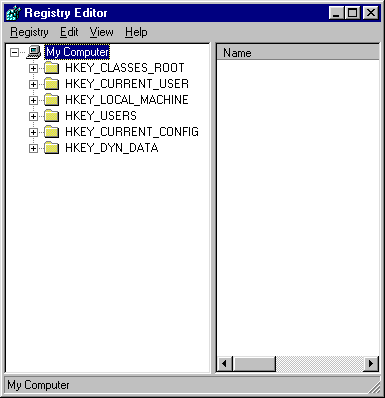
Algumas das possibilidades oferecidas pelo RegEdit e ensinadas nas apostilas:
# Bloquear acesso ao Painel de Controle
# Forçar o estilo clássico no Painel de Controle
# Bloquear a alteração do Papel de Parede
# Desabilitar a Limpeza da Área de Trabalho
# Remover a Lixeira da Área de Trabalho
# Não permitir que o usuário altere o caminho de Meus Documentos
# Não Permitir o Compartilhamento de arquivos recentemente abertos
# Remover e Impedir Acesso à Opção "Desligar" do Menu Iniciar
# Não manter Histórico de Documentos abertos recentemente
# Limpar Histórico de Documentos abertos recentemente ao sair
# Desativar Rastreamento do Usuário
# Bloquear "Barra de Tarefas"
# Remover as dicas dos balões nos itens do "Menu Iniciar"
# Desabilitar Atualizações Automáticas do Windows
# Remover o "Gerenciador de Tarefas" [Ctrl+Alt+Del]
# Limpar o Histórico de Urls acessadas no Internet Explorer a cada 1 dia
# Não Permitir o Internet Explorer coletar informações do AutoCompletar
# Finalização Automática das tarefas
# Optimização no Boot
# Menu Iniciar Máis Rápido
# Descarregar DLLs inutlizadas da Memória
# Aumentar o Número de Downloads Simultâneos no Internet Explorer
# Aumentar a Taxa de Upload
# Limpar o Arquivo de Troca ao Encerrar o Windows
# Pesquisa de Computadores Mais Eficaz
# Desabilitar Cache para Thumbnails (Miniaturas)
# Otimização para o Cache de DNS
# Remover Executar do Menu Iniciar
# Esconder Relógio do Windows
# Limpar Arquivos Temporários do Internet Explorer
# Desabilitar a Notificação de Antivírus Desativado
# Desabilitar a Notificação de Firewall Desativado
# Desabilitar a Notificação de Atualizações Automáticas Desativada
# Disabilitar Auto-Run do CD-ROM
# Desabilitar Windows Messenger
# Desocultar o Relógio do Windows
Estilo: Tutoriais
Tamanho: 3.5 mb
Formato: Rar / Pdf
Idioma: Português-BR


Vídeo Aulas da pasta:
Tutorial Sony Vegas - Iniciantes 1
Tutorial Sony Vegas - Iniciantes 2
Tutorial Sony Vegas Video Edit 1
Tutorial Sony Vegas Video Edit 2
Tutorial Sony Vegas Video Edit 3
Tutorial Sony Vegas Video Edit 4
Tutorial Sony Vegas Video Edit 5 (1-3)
Tutorial Sony Vegas Video Edit 5 (2-3)
Tutorial Sony Vegas Video Edit 5 (3-3)
Tutorial Sony Vegas Video Edit 5 (3-3) Rev
E outros...
Tutorial Sony Vegas - Iniciantes 2
Tutorial Sony Vegas Video Edit 1
Tutorial Sony Vegas Video Edit 2
Tutorial Sony Vegas Video Edit 3
Tutorial Sony Vegas Video Edit 4
Tutorial Sony Vegas Video Edit 5 (1-3)
Tutorial Sony Vegas Video Edit 5 (2-3)
Tutorial Sony Vegas Video Edit 5 (3-3)
Tutorial Sony Vegas Video Edit 5 (3-3) Rev
E outros...
Informações:
Autor: JJZANETTI
Estilo: Video Aulas
Formato: Rar
Tamanho: 21,6 KB (DESCOMPACTADO)
Idioma: PORTUGUÊS

(MegaUpload)_(EasyShare)

Aprenda diversos truques de mágicas, onde o ilusionismo fica fácil, baixe agora mesmo, fique craque e mostre para seus colegas e sua família.
Truques como:
ENTORTANDO UMA COLHER COM O PODER DA MENTE
ENTORTANDO MOEDAS COM O PODER DA MENTE
A MESMA CATA
BOLSO MÁGICO
CARTAS NO BOLSO, EFEITO N° 1
CARTAS NO BOLSO, EFEITO N° 2
CARTAS QUE ANDAM
CORTE PRECISO
DADO INCRÍVEL
DIFÍCIL DE MISTURAR
ENCONTRANDO AS CARTAS ESCOLHIDAS
FESTA DOS REIS
INDUÇÃO
Gênero: Tutorial
Ano de Lançamento: 2008
Nº de páginas: 66
Tamanho: 7,8 Mb
Formato: Rar
Idioma: Português
(EasyShare)

